Earn Money with Lucky Gift & Zazzle's Associate Referral Program! Earn 15% - 32% For Your Referred Sales!

Posted by Unknown Tuesday, 26 November 2013 0 comments
Zazzle offers a unique referral program, that allows ANYONE with a Zazzle account to make money by referring products to others. If you use the referral program and send a link to a friend, and they buy the product, you get 15%* of the purchase price! This can be used as store credit on Zazzle (so if there is an item you would like to buy, you can refer products to your friends, and earn money to put towards it!), or can even be paid to you by cheque or paypal deposit!  

How to Get Started:
You need to set up a Zazzle account. Go to www.zazzle.com and click on “Sign In” which is located in the upper right-hand corner. On the left side of the page it will say “I am new to Zazzle”, click “Sign up!” and complete the form to register.

Complete registration and sign in with your email address and password. Click “My Account” in the upper right hand corner (if you don’t see it, look for your username in the upper right-hand corner, hover over it, and you will see “My Account”).

Picture

Find the “Associates” tab and click on it. You will see your unique associate ID (and 18 digit number).

Picture


Your associate ID will be located under the words "Associate Center".
You will also see the complete code for referrals (it looks like this ?rf=123456789012345678 ). When you add this code to Zazzle links (it can be added to the end of a link to an entire shop, or to specific products), Zazzle will know you have referred a customer. If that customer makes a purchase based on that referral, you will earn a referral fee! :D

Picture


That's all you need! Now it's time to make a referral! 

How to Make a Referral
While signed into your Zazzle account, visit www.zazzle.com/lucky_gift , scroll down until you see “Promote this Store” (or hit “Control+F on your keyboard and type Promote to search for it).
Three options will come up. Option 2 provides you with an HTML link you can post on your website, blog, Facebook, email, etc.


You can also manually copy and paste your referral code onto shop and/or product links. For example, to refer the Christmas Hump Day Camel Tee Shirt from my shop, you would copy the link, and add your referral code to the end (where you see ?rf=238587376344695416, replace with your own unique code).
http://www.zazzle.com/christmas_hump_day_camel_tee_shirt-235451789610961144?rf=238587376344695416


Referral Banners
Alternatively, you can place a banner with a link on your website, blog, etc.
When Someone clicks on the banner on your website and makes a purchase, you will earn 15% of the purchase price! 
To use the banners shown below, replace 238587376344695416 with your own unique referral code. 
Then copy the html code of the banner below and place it onto your web, blog, social media, etc.

Simple Text Link: 

LUCKY GIFT
<a href="http://www.zazzle.com/lucky_gift?rf=238587376344695416">LUCKY GIFT</a>

BANNER 1
 
Size 728 x 90 , Copy this code :
<a href="http://www.zazzle.com/lucky_gift?rf=238054403704815742&CMPN=ban_create_custom_tsirts"><img src="//asset.zcache.com/assets/graphics/z4/uniquePages/banners/teesCustom_728x90.jpg" alt="Create Custom T-Shirts" /></a> 

Size 468 x 60 , Copy this code :
<a href="http://www.zazzle.com/lucky_gift?rf=238054403704815742&CMPN=ban_create_custom_tsirts"><img src="//asset.zcache.com/assets/graphics/z4/uniquePages/banners/teesCustom_468x60.jpg" alt="Create Custom T-Shirts" /></a> 

BANNER 2 . Size 300 x 250
 

<a href="http://www.zazzle.com/lucky_gift?rf=238054403704815742&CMPN=ban_create_custom_tsirts"><img src="//asset.zcache.com/assets/graphics/z4/uniquePages/banners/teesCustom_300x250.jpg" alt="Create Custom T-Shirts" /></a>

BANNER 3 . Size 468 x 60

 
<a href="http://www.zazzle.com/lucky_gift?rf=238054403704815742&CMPN=ban_zazzle_gift_center_2013"><img src="//asset.zcache.com/assets/graphics/z4/uniquePages/banners/holiday2013/Zazzle_Gift_Center_468x60.jpg" alt="Monogram Gifts & More" /></a>


BANNER 4 . Size 728 x 90


<a href="http://www.zazzle.com/lucky_gift?rf=238054403704815742&CMPN=ban_screen_printed_tshirts"><img src="//asset.zcache.com/assets/graphics/z4/uniquePages/banners/teesScreenPrinting_728x90.jpg" alt="Screen Printed T-Shirts" /></a>

BANNER 5 . Size 300 x 250

 
<a href="http://www.zazzle.com/lucky_gift?rf=238054403704815742&CMPN=ban_screen_printed_tshirts"><img src="//asset.zcache.com/assets/graphics/z4/uniquePages/banners/teesScreenPrinting_300x250.jpg" alt="Screen Printed T-Shirts" /></a>

BANNER 6 . Size 125 x 125

 
<a href="http://www.zazzle.com/lucky_gift?rf=238054403704815742&CMPN=ban_screen_printed_tshirts"><img src="//asset.zcache.com/assets/graphics/z4/uniquePages/banners/teesScreenPrinting_125x125.jpg" alt="Screen Printed T-Shirts" /></a>


BANNER 7 . Size 120 x 600

 
<a href="http://www.zazzle.com/lucky_gift?rf=238054403704815742&CMPN=ban_screen_printed_tshirts"><img src="//asset.zcache.com/assets/graphics/z4/uniquePages/banners/teesScreenPrinting_120x600.jpg" alt="Screen Printed T-Shirts" /></a>


Baca Selengkapnya ....

how to create your free blog in blogspot.com

Posted by Unknown Monday, 11 November 2013 0 comments
There are 4 platforms where you can create a freeblog. such as

                                                  1- blogspot.com
                                                   2- wordpress.com
                                                  3- Tumbler.com
                                                  4- webs.com
 Here you will get a subdomain name. Such as yoursite.blogspot.com
                                                                          or yoursite.wordpress.com
and its hosting is free. However if you want a domain name, such as
                                                                  yoursite.com
 then you have to spend some money to purchase your own domain and monthly some hosting fee. eg- if you want to purchase yoursite.com from godaddy then you have to spend $10 for one year  and every month some hosting fee like $7 from hostgattor

so, if you can not afford for a domain name and hosting fee, then choose to create free blog in blogspot.com and later you can purchase a domain and blogspot has an option to redirect your blog through your custom domain and its hosting is free.

so, lets start how to create a free blog in blogspot.com. It is really easy to create a blog in blogspot.com. It is completely free service. So, before i am going to show you the step by step method how to create a blog and how to write an article with keywords, i want to tell that i am not a expert blogtech, or any kind of seo expert. But i know the simple things which has worked for me and i hope it will also work for you. Most of my way of money making depends on referrals. Blogging is one of the best way to get referrals. After successfully creation of your blog you need to optimize it so that your blog will appear in search engine and you will get traffic to your blog which will help you get many referrals. So, lets start


If you dont have a gmail account then create one here . After successfully create your account just log into your account. then see below. click the more tab. it will show you all the google product. Then click on blogger 
 
Now you will find your blogger dashboard.  This is where you will create your own blog. see below
click on new blog
 
once you clicked the new blog , you will find a pop up window, which will ask you title of your blog, address of your a blog means your sub domain name, and choose a template for your blog. see below
 
Now here three things you will be mindful about.

You need a title for your blog
You need a subdomain which is address
 And choose a template

What kind of title you have to choose? You need to choose a title which you are going to write about. and your title must contain the keyword
what is that keyword?
Keywords are the popular words which is used by people while they search something in search engine. for better understanding

Suppose your blog is about ptc site then you can give a title similar to ptc site
                                                    like-" top 10 elite ptc site" which contains keyword "top, elite, ptc site"
                                               
eg- Your title- Top 10 ptc sites
      Your blog address- Top10elite ptc site or
                                     ptc review
                                       best ptc sites
choose an address for your blog. If that address is not available then do slightly variation, like

                    Top10elite-ptc.blogspot.com

After you set your blog address your next step is to choose a suitable template for your blog. You can choose an available template from blogspot or you can choose a custom template. For choosing a custom template for your blog you can search it from google. In google search just type free template for blogger. You will get many free template to download. just choose an attractive template which will be suitable for your blog. Download it. After download the template, extract it's XML files and save it your notepad or wordpad. Now a days many wordpress theme which has been converted to blogger theme is available for free. You can download a free wordpress theme and upload it in your blog.

Then log into to your blogger dashboard, see below how to upload the template
  
after clicking the template, you will find an option at the top right corner "back up/restore"
then click back up/restore to upload your xml file of the template which you have saved earlier in your notepad . The whole process will be

             your blogger dashboard-->template-->backup/restore-->upload the template

Otherwise copy the xml file from your notepad, go to your blogger dashboard, click on template, then click on edit template, then delete the existing xml of your template and paste the xml which you have copied from your notepad.

Now save the template


After finishing that step, your next step will be create your post for your blog. For creating a new post , you have to click post and then click on new post. Choose a title for your post which you are going to write about and remember your post title should contain keywords. You need to choose the keyword which is searched by many people globally. so here i am going to tell you one free keyword tool which is google adwords keyword tool . This tool will help you to find the keywords. so, you need to choose the keywords which is searched by many people globally. Suppose you are searching the keywords about ptc sites , then in google keywordtool fill the word or phase with "ptc sites" and fill the captcha and then click on search. now you will get whole bunch of keywords. Choose the keywords searched by more people global monthly searches. Pick up some keywords.

                               Again search for related keywords. Another keyword tool you can use for getting related keywords, which is seo centro. Seo centro has many seo tools. you can use its keyword suggestion tool. Now you just put a keyword which you picked up from google keyword tool

Suppose i got a keyword from google keyword tool which is "work from home". Now i will put that keyword in seo centro keyword suggestion tool to find out related keywords. See below
 
Now you got many related keywords. So pick up those keywords and start writing your post using those keywords. Your post has two sections. One is compose and another is html.
 In compose you can write your post, insert a link,image and video. and in html section you can put your banner code. One thing remember, when you write your post, never try to copy from others content, if you copy others content then your blog will not get traffic because your content will be duplicate and will be penalized by google. And google DMCA has given the authority to original owner of the blog to remove your link from google and ban your account. So, create your own unique content, write it from your own.

                  After writing your post you can hit the publish button. Now your post has been published. Your next step will be add your site url to google webmaster tool. and add a sitemap for it.
google webmaster is the tool which let you know the indexing status of your site.


There are 3 things you can do with google webmaster tools

                            1- Add your site url
                            2-verify your ownership
                            3- submit a sitemap.
If you do that then your site will be indexed very fast by google. All these 3 steps are easy. just log into google webmaster tool. After log in, it will ask you to add your site url. then add your site url. Next step will be verify your ownership. Once you add your site url you will find an option manage your site, just right side of your blog url.  click the option manage your site. Then verify your site. follow the instruction to verify your ownership in google webmaster tools. There may be 3 way to verify your ownership. but the easy way to verify your site is just copy the html link and paste it in your template head tag. After verify your site  , add a sitemap
Your sitemap url will be http://abc.blogspot.com/atom.xml?redirect=false&start-index=1&max-results=500
means  after your site URL just add atom.xml?redirect=false&start-index=1&max-results=500

If, you do not know how to add a sitemap , then just click on your site url in google webmaster tool. After clicking the site url in left side you will find an option optimization. Then click on optimization, next you will find an option sitemap and click that sitemap. once you click on sitemap you will find an option add sitemap which is top of the right corner in google webmaster tool.

its done

Then create a feed for your blog in feed burner and submit your feed url to rss directories.

META TAGS

META TAGS are important for search engine. Metatags contains the title, keywords, and the description of your blog. If you do not use metatags properly, it will create many duplicate title and descriptions which will cause your blog not to get more traffic and rank in google.


so here is the metatag format, you can use

                               <head>   <b:if cond='data:blog.url == data:blog.homepageUrl'>
                            <meta content='your title here' name='title'/>
                           <meta content='your page description here' name='description'/>
                           <meta content='your keyword description here' name='Author'/>
                           <meta content='index, follow' name='robots'/>
                           <meta content='author' name='author'/>
                           </head>

                       It will be placed in head tags in your template. Please follow this step. log into blogger dashboard->select template->select edit html-> select proceed. Then you will find your blog template and place all this meta tag  in head tag.


your metatags will not be visible in your web page, but it will help search engines to understand what is your page about.

ROBOTS.TXT

                        Setting robots.txt is important, because this is where you will let search engine bot to index your web page. Here you are privileged to tell search engine bot which page of your blog to index  and which page should not. If you don't want a particular page of your blog not to be indexed, then you can block that url in robots.txt


Even if you can block a particular search engine or directories not to index your webpage in robot text. So, if you don't use robots.txt properly then your robot will eat your blog and your blog will not be indexed by search engine bot. You can see below, the proper way to implement  your robots.txt.

 User-agent: Googlebot
Disallow:
User-agent: Yahoobot
Disallow:
User-agent: bingbot           
Disallow:
User-agent: MSNBot
Disallow:
User-agent: Technoratibot
Disallow:
User-agent: *
Disallow: /search
Allow: /
Sitemap: http://yoursite.blogspot.com/atom.xml?redirect=false&start-index=1&max-results=500


for implementing this process log into your blogger dashboard and click on setting then click on search preference. you will find custom robot text. It will ask you enable custom robots.txt? select yes . copy the above code and paste into your custom robots.txt and never forget to replace  "yoursite"  with your site url                           
       
STOP GOOGLE TO REDIRECT YOUR BLOG URL TO COUNTRY SPECIFIC

after few months of creation of your blog, your blog url address will be changed. suppose your blog url  abc.blogspot.com . when people from india viewing your blog, they will see your blog url "abc.blogspot.in" instead of abc.blogspot.com

similarly when people from australia visit your blog they will see your url "abc.blogspot.com.au"
for japan it will be "abc.blogspot.jp" like that it will redirect your blog url in 15 countries.

Why does google do this?

google does this because if the content of your webpage violate the law of a specific country then google will block your url not to be visible in that country. how ever your blog will be accessible in other countries

 is redirection bad for your blog?

yes, it is seriously bad, as it affects your

                                  1- seo
                                  2- traffic
                                   3- alexa rank
                                  4- google rank
From my own expreience, redirection cause your blog to get less traffic, and it will affect your alexa rank
because your blog divided into 15 different url address. so every url has different alexa rank and your back links will not be same for every url.

STOP GOOGLE TO REDIRECT YOUR URL

There is a way to stop google not to redirect your blog url for country-specific. just copy the code below and paste it into your template in between head tag.

                              <head>
 <script type='text/javascript'>
var blog = document.location.hostname;
var slug = document.location.pathname;
var ctld = blog.substr(blog.lastIndexOf(&quot;.&quot;));
if (ctld != &quot;.com&quot;) {
var ncr = &quot;http://&quot; + blog.substr(0, blog.indexOf(&quot;.&quot;));
ncr += &quot;.blogspot.com/ncr&quot; + slug;
window.location.replace(ncr);
}
</script>
</head>

Follow this step
Log into blogger dashboard->select template->click on edit html
Now copy the code above and paste it in between head tag

<head>

          code

                </head>

Then save the template. now you are done. After you have done this, your next step will be optimize your blog in order to make your blog visible in search engine. 
 
 F58VASERDSYH
 

Baca Selengkapnya ....

How to make money online with clixsense even $65 in a week

Posted by Unknown Sunday, 10 November 2013 0 comments
Now clixsense is not limited with PTC ads only. It has multiplied its earning source. We can make good  money from its different earning sources. First i want to tell you, there is no need of any special skill or talent to make money from clixsense. A beginner who joined this site also can earn a ridiculous amount of money . Without thinking the site's legitimacy anybody should join because this site has already proven its longevity stance . So start your online carrier today with clixsense . No matter the way you are earning money online , but never miss this site. Its highly recommended for you. Before we are going to discuss about clixsense i just invited you to sign up at clixsense by clicking the link below. 

  CLICKSENSE 

If you are still having any trouble to sign up with clixsense and how to earn money from it, then watch this video


If you are new to online money making, and do not know what is PTC sites and how it works then read this post How to make money with ptc sites

why clixsense? Why it is recommeded?

1- clixsense does not set any limits the amount of ads you click per day
2-clixsense does not set any limits the amount of direct referrals  you can have
3-clixsense was the company that started the ptc craze in 2007
4-clixsense has the lowest advertising rate in the industry
5-clixsense does not charge the ridiculous amount of money to upgrade your account.
6-clixsense has no maximum amount of cashout. You can make it.

what did you observe? You will get unlimited ads to click. There is no condition how many direct referrals you are going to have?In clixsense as a standard member you can keep unlimited direct referrals. Even upgrading cost of clixsense is too low. Which is $17 per year. What is this referral? referrals are the persons who have joined under you. Who is going to work for you. To be honest if you want to earn more money you need referrals. If a site will not allow you to keep  unlimited direct referrals, then how could you promote your referral link.

And it is oldest ptc site, established, and loyal to its members. Then what more you need?
This is the reason why clixsense is the most preferable and trustworthy. It's the completely legit , honest and paying ptc site which i have ever known.

HOW CAN I MAKE MONEY WITH CLIXSENSE?

There are several ways to earn money with clixsense. We can earn money by


1- clicking ads
2- completing tasks
3-completing offers and surveys
4- playing clixgrid
5- daily checklist bonus
6-Affiliate program

The first way to make money  

with clixsense is just clicking ads. There are unlimited of ads which will be added to your account time to time. Just log into your account click those ads. Unlike other ptc site clixsense has no limitation of ads in a day. You can check it several times in  a day otherwise download their toolbar it will help you to be informed about ad notifications.


KINDS OF ADS
                    
 You will get different types of ads to click
                                   1-micro ads
                                   2-mini ads
                                   3-standard ads
                                   4-extended ads
MICRO ADS- if you click micro ads it will take 5 seconds to view and will cause you to earn $0.001 each
MINI ADS- This ads will take 15 seconds to view and you will be paid $0.005 for each
STANDARD ADS- This ad will take 30 seconds to view and you will be paid $0.01 for each
EXTENDED ADS- This ad will take 60 seconds to view and you can earn $ 0.02 for each
So it is clear that you can earn  $0.001 to $0.02 for each ad you click. For better understanding see the screenshot below
pink color- extended ads
green color- standard ads
orange color- mini ads
yellow color- micro ads


earn money with clicking ads


Second way to make money 
 with clixsense is completing task. tasks are micro jobs or small jobs provided by crowdflower. There will be number of tasks available for you to complete everyday.
you need to follow certain instruction  before completing a task. Once you completed a task, money will be added to your clixsense account balance. From each task you can earn few cents to several dollars.

Third way to earn money from clixsense is completing offers. Offers are daily surveys,  sign up a particular website, cashback shopping, free downloads. Surveys are available according to the demographic locations. Each survey you complete you can earn $0.30  to several dollars.


fourth way to earn money from clixsense is playing clixgrid


clixgrid 


See this picture . This is the clixgrid. Here as a standard member you have the opportunity to click 30 times. But for premium member 60 times. Each time you click it will open a sponsor's website. There you have to view 10 second to know whether your luck support to win the clixgrid or not. You can win upto $10 which will go directly to your clixsense account. There is no special strategy to win a clixgrid. The secret of winning a clixgrid is to clicking everday. Its a game, the more you play the more chances will be there to win. 


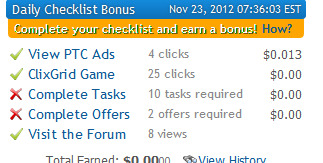
Fifth way to earn money from clixsense is through checklist bonus. see below


how to earn with clixsense checklist bonus


Here in nov 23 i have clicked ptc ads 4
clixgrid 25 times
visited forum 8
the red cross mark you  have noticed  beside complete task  or offers these are the other requirements to get daily checklist bonus. 

So here is the minimum requirements to get daily  checklist bonus
                                                      ptc ad - 2clicks
                                                      clixgrid-15 clicks
                                         either  complete task - 10 or complete offer -2
                                                      visit forum- 1 page
If you have met that requirement in a particular  day  then you will get checklist bonus  $0.50


how to win checklist bonus


Sixth way to earn money with clixsense is through its powerful affiliate program
I like the clixsense affiliate program especially the way it designed. Affiliate program means its referral program. When you joined in clixsense you will get  your unique referral link. Now if somebody joined in clixsense by clicking your referral link, then they will be your direct referrals.
you will get commissions each time your direct referral click ptc ads, purchase advertising, completing task or offers. you will only earn commission from direct referrals but not from your direct referral's referral. In clixsense earning of a premium member is substantial higher than the standard member. So, it will be wise if you upgrade your membership to premium.


WHY CLIXSENSE AFFILIATE PROGRAM IS  SO POWERFUL?

It is powerful because the commission you earn from your referrals.

1-COMMISSIONS FROM PTC AD CLICK


more referral commission for premium membership

Here we can see as a standard member or a premium member  how much commission we can earn from our direct referrals PTC click in different types of ads.

2- SIGN UP BONUS

                These sign up bonus is not for standard member.
if you are a premium member of clixsense , then you can earn $0.50 sign up bonus if your direct referral earn $1 from ptc ad click. 

3-ADVERTISING SALES

              clixsense is the best place to advertise. people want to purchase credit, to advertise their referral link or their website to get traffic. so in two way they can advertise their link. Either they have to purchase ad credit or purchase a clixgrid link. so whenever your direct referrals purchase a ad credit or a clixgrid link then as a standard member you will earn 10% commission upto $1 per referral but as a premium member you can earn commission 10% upto $2 per referral. However there is some limit per referral. As a standard member you can earn upto $50  per referral and as a premium member you can earn $100  per referral.

4- COMMISSIONS FROM TASK

you also get commissions whenever your direct referrals complete the task successfully.  As a standard member you can earn 5% of your direct referrals  task earning and a premium member you can earn10% of your referral's earning.

5-COMMISSIONS FROM OFFERS

In clixsense daily number of offers are available. you also earn commissions whenever your direct referrals complete the offers. As a standard member you can earn  5% of  your direct referral's offers earning and as a premium member you can earn 10%  of their offers earning

why it is wise to upgrade your membership to premium

You can earn money from clixsense as a free member. But you will realize the true power of clixsense when you upgrade your membership into premium status. You will enjoy all the benefit from it once you upgrade your membership. Your earning will substantially grow even without your knowledge your  account balance will reach $100.

here is the benefit

Suppose your direct referral upgrade his membership into premium status you will instantly get $2
as a standard member. But as a premium member not only you will get $2 when your direct referral upgrade his membership but also $1 when your direct referral's referral upgrade into premium status and you will get it upto 8 level's deep. So for better understanding see below

earn money from referrals upto 8 level

Now you can realize why it is wise to upgrade your membership into premium. You need $17 to upgrade your membership into premium for a year which is very less comparative to other ptc site. See, here i am going to give another screenshot how your money will grow, if you will be a premium membership. suppose you have some direct referrals, your direct referrals have their direct referrals like that it will grow upto 8 levels. see  below. This screenshot is Downline size of a clixsense member who has earned lot of money from his referrals.


earn huge money
                  

  not only you will get $2 whenever your direct referrals upgrade their membership but also $1  from each of your direct referral's  referral and their referrals upgrade their membership and it is upto 8 level deep. So, that is what make clixsense unique.


HIGHLIGHT THE BENEFIT OF A PREMIUM MEMBER
                 1- Sign up commissions $0.50
                 2- commission upto $2 whenever your direct referral purchase ad credit or clixgrid link
                 3-higher direct referral click commissions
                 4-more chances to win clixgrid (50) times
                 5-more ads available
                 6-8 tier affiliate program
                 7-welcome ad credit 1000
                 8- minimum cashout $6, but for standard it is $8

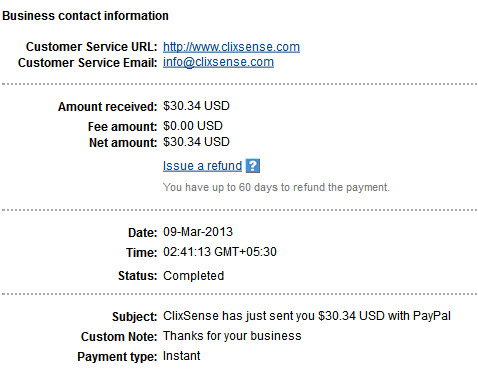
PAYMENT PROOF 


payment proof


paypal


 Payment processor-  You will recieve money through paypal or payza. If you are from india, then you will receive money through paypal only Now in conclusion, i wanna say that because of my offline activity i was not an active member of this site even though i have joined this site several months back.For last two  months i became active in this site and upgraded my membership.  i believe in clixsense because i am earning good money from it comparative to other ptc site. Even you can also earn serious  money from it, once you will be active every single day and upgrade your membership. Upgrading your membership in clixsense will not cost you more. It is very little which is only $17 for one year. But you will get absolute benefit from it. It will bring you more profit. See, you do not have to spend money from your own pocket to upgrade your membership only thing you can do be active in clixsense, everyday click on ads, and complete the offers it will take few days to reach $17 . Once you reach $17 , then upgrade your membership. After that you will realize the true power of clixsense even without your knowledge your account balance will reach $100 within some days. As all we know PTC site is a referral's game. But getting referral's for clixsense is not a difficult thing. After joining this site just create your own blog and write your experience with clixsense and how it works, then promote your blog with your referral link. you can promote your referral link in social network site like facebook  and traffic exchange .
         so i encourage you, If you are not a member of clixsense then join today with clixsense.

                 JOIN TODAY BY CLICKING THE BANNER BELOW

Baca Selengkapnya ....

VISIT MY ZAZZLE STORE


See other gifts available on Zazzle.

BOOST YOUR SEO HERE

WANT FREE STUFF ?? GO HERE ASAP !!!

SHRINK URL AND GET PAID

CREATE & CUSTOM YOUR OWN PRODUCT

Create Custom T-Shirts

GET PAID TO SURFING

The Most Popular Traffic Exchange

Blogger news

Buat Email | Copyright of WORK SMART, LIVE SMART !.